Simple
Simple is better.
In 2018, a little more than two years and one completely different world ago, I wrote down my photo workflow for the sake of documenting it.
The secondary purpose was to have something I could revisit and simplify. Enough small changes have stacked up since then to justify another snapshot.
The 2018 version still had a lot of “save everything, everywhere, just in case” energy. That made sense. RAW files are the negatives. Losing them would be bad. But by 2020, fewer files deserved active attention.
Simple did not only mean fewer steps. It meant a smaller catalog, fewer unedited RAW files, and less for future-me to inherit.
The 2020 process
The broad shape is familiar: transfer, back up, import, cull, edit, export. The difference is that the cull now happens before the whole shoot gets comfortable in Lightroom.
My process at present is:
- Transfer images
- JPGs go to
/JPG/on the Desktop. - RAWs go to a dated folder, like
/2020-10-12/.
- JPGs go to
- Back up and import
- JPGs go to Google Photos, with one gallery/album for each camera type.
- RAWs go to the NAS, which backs up to Google Drive, with folders organized by format and camera type.
- I pause Lightroom CC syncing and import the RAWs.
- Cull
- I review everything and remove anything I know I am not selecting for editing.
- Once the obvious rejects are gone, I resume Lightroom CC syncing.
- Edit
- My Neutral + Lens Correct preset is automatically applied to all imported images.
- My “Go To” preset gets applied along with exposure, color balance, and whatever else the shot needs.
- Export
- Final exports go to a “Selects” gallery on Google Photos.
- They may also go to Instagram, IG stories, or the archive/shoot posts I was maintaining at the time.
Compared with 2018, this is less sprawling. It is still very much a 2020 workflow: Google Photos, Google Drive, Lightroom CC, NAS storage, Instagram, the whole thing. But Lightroom is no longer where every frame has to live forever.
Culling became the important step
The one part I am still working through is the culling and review process.
Even with a 5K iMac display, I still feel like the nicest screen I have at present is on an iPhone XS Max. That sounds ridiculous until I am making picks. The screen is great, the phone is always with me, and reviewing in smaller chunks helps.
Depending on the situation, sometimes I will let the entire shoot sync to Lightroom just so I can review and cull on my phone.
There are rumors of a Mini-LED iPad Pro coming in early 2021. If that happens, this workflow may need to adapt, especially because direct import from the camera is possible. For now: get the files safe, cut the obvious misses early, then let the smaller set move through Lightroom.
The important part is the order. The cull is not cleanup anymore. It is part of deciding what the archive is.
Catalog Bloat
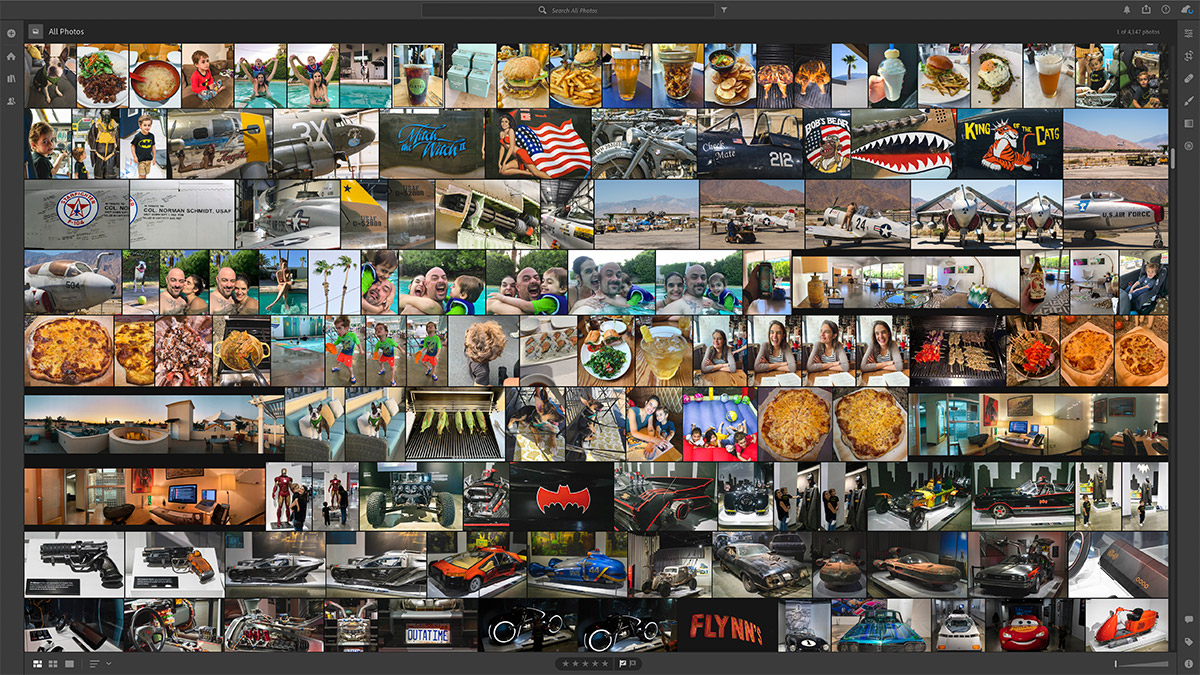
A few weeks ago I realized that, in addition to paying Adobe $30/month for 2TB of cloud storage with a Creative Cloud membership, my catalog was full of shots I would never touch again.
For the majority of the 15 years I have been shooting, I did not follow a strict photo cull. I kept things because storage existed, backups existed, and RAW files felt too important to question. That sounds responsible until the catalog becomes a slow, expensive junk drawer.
Applying the current workflow to my entire catalog took most of a weekend. It also removed over 2/3 of what I had been saving.
Not only does this bit of digital housekeeping feel great now that it's done, it will also save $180/yr with the downgraded storage plan - which, up until today, I had been paying to store raw files for photos I was ultimately never going to edit.
— Bill Anastas (@banastas)
That was the practical reward: $180/yr saved and a downgrade to the $15/month plan. Not glamorous, but satisfying.
The better reward is that Lightroom feels less like a place where old decisions go to become somebody else’s problem. The catalog is smaller. Syncing is less annoying. Browsing old work is faster. The good shots are not buried under every alternate angle, missed focus, duplicate, and “maybe someday” RAW file.
Why Deleting Helped
There is something genuinely nice about scrolling through years of photo selects faster. Not because the library is smaller as an abstract virtue, but because the things left behind are more likely to be worth seeing.
I thought it would be tougher to delete that many images. It helped that copies still existed elsewhere. The NAS and Google Drive had the durable RAW backup, and Google Photos made old JPGs easy to view. I was deciding what deserved to stay in the active editing catalog.
The useful question became very simple: “honestly, will we ever edit this shot?”
Asking that question across 15 years of photos made the answer easier on newer shoots. If a frame is not useful now, and it is not likely to become useful later, keeping it in Lightroom is maintenance debt with a thumbnail.
The point is not to become precious about minimalism. I do not need the photo library to prove anything. I just do not want another weekend-long purge 15 years from now.
The expensive cable
The one new piece of hardware that has really helped is ridiculous.
An Apple 2 meter Thunderbolt 3 Pro Cable with a top transfer speed of 40Gb/s costs $129. That is insane, which is what I said when I first saw it.
It is also one of the most useful parts of the setup.
Transfers from my camera used to take 10, 20, even 30 minutes, depending on how many shots were on the card. With this cable, I do not think I have waited longer than a minute. Usually it is seconds.
The price still feels silly. The time saved does not.
The point of this snapshot
So this is the 2020 version: Google Photos, Google Drive, Lightroom CC, a NAS, and exports where they made sense then.
But culling became part of the workflow instead of an afterthought. Keeping everything had started to cost money, time, attention, and trust. A smaller Lightroom catalog was faster, cheaper, easier to live with, and less likely to become a burden.
That is the bridge from the 2018 setup. Back then, the problem was too many systems and too much backup anxiety. In 2020, the problem was the pile itself. The next simplification will be about the systems again. This one was about making the archive smaller on purpose.