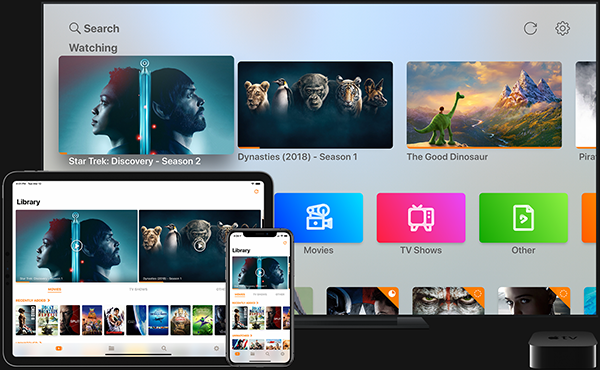
I’ve been a bit obsessed with home media management since the day I found out about XBMC on the original Xbox.
That was the first time owned files felt like they could be something more than a pile of folders. They could have posters, descriptions, and a real interface.
When the first-gen Apple TV launched, I spent a ridiculous amount of time manually entering metadata into my files for a crude list view that was still difficult to navigate and basically impossible to search. It was overbuilt, but the impulse was right. I wanted my own media to feel as clean and accessible as streaming was starting to feel.
That is the chase this has always been for me: making owned media feel like something I would actually choose to browse. By 2020, Infuse was the closest I had come.
Plex
When I first heard of Plex, I had never been so excited by a single piece of software.
Plex took a folder of media, scanned the files, and automatically pulled in the metadata that made the whole thing legible: posters, descriptions, cast lists, seasons, episodes, and watch status.
After that first scan, Plex acted like a personal Netflix. It kept track of what I was watching, remembered where I left off, and suggested what to watch next. It turned a folder tree into a library.
The feature that made it especially useful for me at the time was cloud-drive support. Plex could connect to my cloud storage and let me stream my personal library wherever I was. For a while, that worked so well that I disconnected my hard drives, put them in the closet, and relied on streaming my own files from the cloud.
That was the first version of the dream that actually felt real.
Local + Cloud
At a certain point, a fear started to linger in the back of my head: what if I lost access to my cloud account and the data it contained?
I looked into different NAS solutions, but one brand was hard to ignore, so I pulled the trigger on a Synology DiskStation and two WD Red 8TB hard drives. Synology has been reliable, and the WD drives are workhorses.
The feature that made everything work for me was Cloud Sync. It keeps a local copy of everything in the cloud and preserves parity between the two environments.
That solved two problems at once. The cloud copy was still the convenient access layer. The NAS was the durable, local, under-my-control copy. Sync kept them from becoming two separate messes.
It also changed how I cleaned things up. My cloud drive had become a dumping ground for work files, project files, home files, and media. Previewing and rearranging that kind of mess through a web interface was miserable. Being able to make local changes, rename files, move folders, and have those edits sync back to the cloud saved me a stupid amount of time and frustration.
The point was not just backup. It was trust. If the cloud account disappeared, I still had the library. If I was away from home, the cloud copy still made the library reachable.
Infuse
For a while, I was happily paying Plex $39.99/yr for a premium membership that mostly showed my support for the product and my hope that it would exist for a long time.
Then Plex shut down cloud libraries, noting that server costs had become too high to maintain the feature. I still do not fully understand why Plex needed server-side infrastructure for what I had understood as a connection between my cloud drive and my viewing device. Whatever the reason, I could no longer connect Plex to my cloud drive and stream media that way.
Plex also started pushing parts of the app that users could not really disable, including live channels, and the interface began to feel more cluttered. Then came content deals with MGM, Lionsgate, and Warner Bros., which made it look to me like Plex was drifting toward mini-Netflix territory rather than staying focused on personal libraries.
That does not make Plex evil. Plex had solved a real problem for me. The issue was alignment. The feature I cared about most had gone away, while the product seemed to be moving toward features I did not want.
Around this point, my brother introduced me to Infuse, and I finally took a closer look. Infuse gave me cloud access to my personal library again, came from a team that seemed focused on playback and library experience, and cost roughly one-quarter of what I had been paying for Plex Pro.
Moving to Infuse exposed one last project: a refactor of my folder structure and naming conventions so the library would scan cleanly and still make sense to a human being looking at the files.
Metadata
Infuse has a great reference on metadata, but it still took trial and error to get high auto-detection without turning my folders into nonsense.
The important thing to know is that Infuse pulls metadata primarily from TMDb and TVDB, both of which are community-built.
If Infuse has trouble identifying something, a quick lookup on either site usually explains why: title formatting, year disambiguation, or a missing record.
The goal was not just to make Infuse happy. I wanted a structure that was readable if I ever had to browse the NAS directly. Automation is great right up until you need to fix one file by hand.
Movies
Movies were the easy part. My movie folder keeps everything at the root level using this naming convention:
/[Film Name] [Year].[ext]- Auto-detect Success: 99.69%
That format works because the folder is flat and movies rarely need more hierarchy. The year disambiguates remakes and duplicate titles, and the whole thing stays easy to scroll outside Infuse.
TV
TV took more fine tuning. Each show lives in its own folder, and each episode gets the show name, season, and episode number:
/[Show Name]/[Show-Name]_[Season][Episode].[ext]- Auto-detect Success: 99.85%
Based on the Infuse spec, repeating the show name in the folder and the filename is redundant, but Infuse does not seem to mind. It keeps the files useful outside Infuse.
With Plex, I had been using a ShowName/S01E01.mp4 format. That worked, but it meant every show folder contained files with the same generic names. If I needed to adjust something manually, the filename itself did not carry enough information.
The Infuse setup is more verbose, but that is the point. The parent folder gives the library structure. The full filename gives each episode enough context to stand on its own.
Library
Infuse wins on so many little workflow details, but one of its best tricks is allowing me to swap out libraries on the fly.
Away from home, I can switch to the cloud library and have access to everything on the go. Back home, I can switch to local storage and stream without using bandwidth.
That sounds minor until you have spent years trying to make one system cover every context. Infuse lets the local library be local and the cloud library be cloud.
It also creates collections automatically. I can browse pre-sorted groups by release decade, genre, or even resolution.
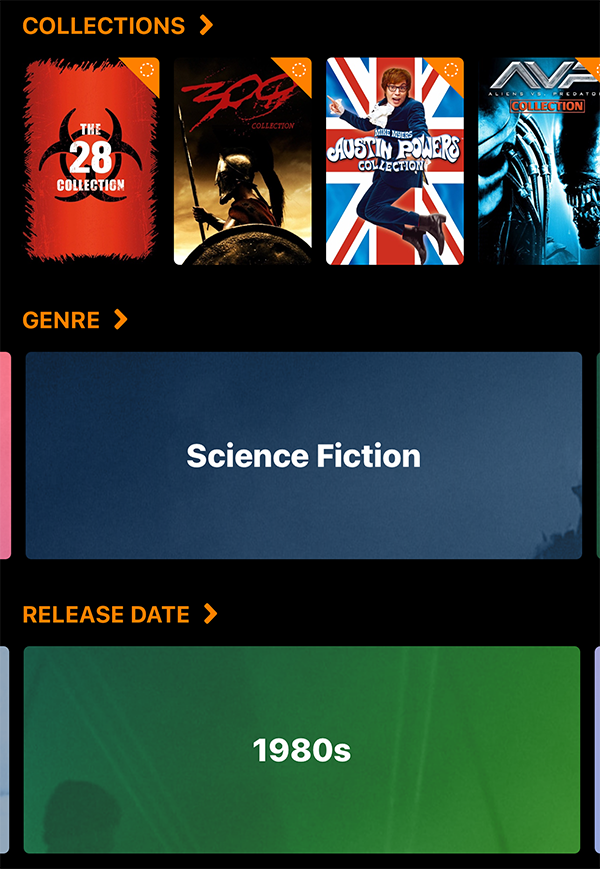 Sorting by Collections, Genre, and Release Date
Custom playlists are also an option, but I have not explored them much because they can only be created through the iOS or Apple TV app. That makes the task more cumbersome than it should be. A Plex-like web interface would be better, but it is not a deal-breaker.
The core experience is what matters: same library, clean metadata, Apple TV and iOS support, cloud when I am away, local when I am home.
The Dream
Ultimately, this idea of a completely digital media library has been a dream I have been chasing for over 15 years.
Infuse has brought my own media into parity with the way I buy and watch media now. Only having to switch between two apps, Infuse and the Apple TV app, both with cloud access, has simplified what could have become a mess of a library.
Movies Anywhere is another thing I still cannot quite believe exists, mostly because I cannot believe the studios agreed to it. But it has been the final piece for consolidating scattered purchases inside Apple’s TV app.
That leaves me with a system that is still overbuilt, because of course it is, but finally overbuilt in the right direction. The organization is not the point. Making the owned library easy enough to use is the point.
My hope now that this is all worked out is that the organization obsession will subside a bit, at least until the next shiny thing shows up, so I can finally spend more time watching.