Some projects get me because they reveal a system that was already there.
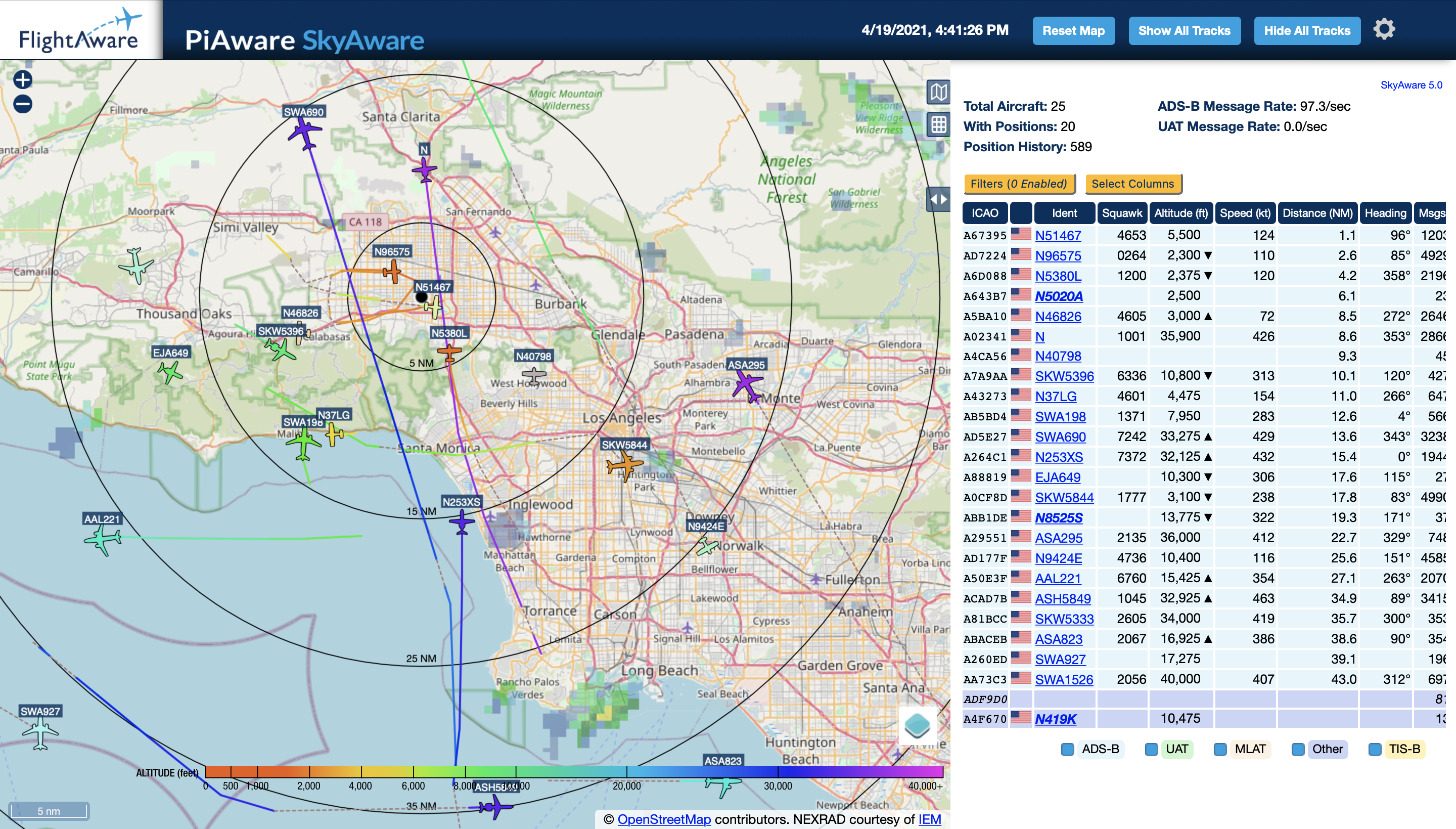
PiAware is one of those. With a Raspberry Pi, a USB ADS-B receiver, and a small antenna in my window, I suddenly had a live view of aircraft broadcasting over Los Angeles. Not a polished app view of someone else’s data. My own little receiver, listening to the sky from my apartment.
I did not know this was something a normal person could build. Once I found out, though, the appeal was immediate: cheap hardware, public radio signals, a local map, and that very specific pleasure of turning background infrastructure into a thing I could actually inspect.
What PiAware is
PiAware is FlightAware’s software for running an ADS-B receiver on a Raspberry Pi and feeding the data back into FlightAware’s network.
ADS-B is the system many aircraft use to broadcast their position, altitude, speed, and identity. Sites like FlightAware aggregate those signals from receivers all over the world. PiAware lets you run one of those receivers yourself, contribute to the larger network, and still see the local data directly on your own device.
FlightAware also gives feeder accounts extra access as a thank-you for contributing data, which is a nice bonus. But the account perk was not the hook for me. The hook was having a small, owned sensor on the network.
My setup
I purposely installed PiAware on a Raspberry Pi Zero W so that I could eventually mount it on the roof without introducing a lightning path back into my home network. So far, though, keeping the antenna in a window has worked better than I expected.
That is part of why this feels less like a gear project and more like tiny personal infrastructure. It is not complicated, but it turns a corner of the apartment into an instrument. The Pi sits there quietly, the antenna listens, and the map fills in with aircraft that were already moving overhead.
Eventually I may install the antenna on the roof. For now, the window setup is good enough that I have not felt much urgency to change it.
What I could see from Los Angeles
The surprising part was range. I am about 21.9 miles from LAX, and even with the antenna sitting in a window, I can often see transponder signals from aircraft on the ground at the terminals.
That is the moment the project stopped feeling like a toy. The airport was not abstract anymore. It was a local system I could observe from my desk: departures, arrivals, ground traffic, IDs, altitude, range, and patterns that had always been there without being legible.
On most days, this little setup averages a 100+/s ADS-B message rate, which seems pretty good for a receiver that is still just sitting inside by the glass.
The parts
This was my parts list at the time. Check FlightAware’s current PiAware setup notes and hardware recommendations before buying anything, because Raspberry Pi availability, receiver options, filters, and antenna setups change.
I have not done an A/B test with or without the filter. I originally bought it because I was in a congested RF area, and it seemed worth having in the chain.
- Raspberry Pi Zero W
- FlightAware Pro Stick Plus
- ADS-B Dual 978 MHz + 1090 MHz Band-Pass SMA Filter
- Proxicast 25 ft Low-Loss Cable
- 1090 MHz ADS-B Antenna
FlightAware has the official PiAware install instructions, so I would start there rather than trust an old parts list from 2021 as a buying guide.
Why this kind of project sticks
I like projects that make hidden infrastructure legible. PiAware does that immediately. You plug in a small receiver, open a map, and a piece of the city’s logistics layer appears. Aircraft that were just noise overhead become positions, message rates, range rings, paths, and habits.
That is useful even if you are not trying to become an aviation person. It changes the texture of where you live. The sky stops being empty space between buildings and becomes a system you can watch from your own window.